
Category: blog
Choosing a business phone system affects more than call quality.
It also determines how the system is paid for, maintained, secured, expanded, and restored after an outage.
For small businesses, the decision often comes down to two models:
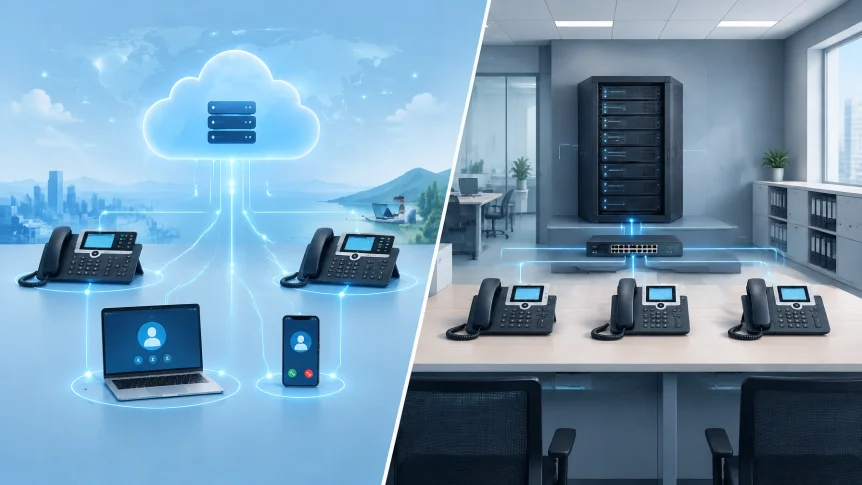
- Cloud VoIP: The phone platform is hosted and managed by a service provider. Staff connect over the internet using desk phones, computers, or mobile devices.
- On-premise VoIP: The business operates a phone-system server or appliance at its location. The business manages the equipment, software, and related infrastructure.
Neither model fits every organization. The right choice depends on staffing, technical capacity, business continuity needs, and the full cost over time.
X-Tek supports both cloud and on-premise VoIP systems. The comparison below can help identify which model to evaluate.
Cost
Cloud VoIP usually spreads costs into recurring per-user or per-feature charges. Initial costs may be lower because the business does not need to buy and install a PBX server. Phones, network upgrades, implementation, and selected features may still add costs.
On-premise VoIP usually requires more spending up front. The total may include the PBX hardware, phones, licenses, installation, cabling, network upgrades, backup power, and support. Hardware also needs maintenance and replacement over time.
A subscription is not automatically cheaper. Owning equipment is not automatically cheaper either.
Compare the total cost over the expected life of the system. Include:
- Hardware, phones, licenses, and implementation
- Monthly service fees and calling costs
- Internet and network upgrades
- IT administration and vendor support
- Security updates, backups, and replacement parts
- Downtime risk and recovery costs
- Number-porting or contract exit costs
Pricing varies by provider, feature set, user count, and implementation. Market estimates are useful for planning, not a substitute for a quote. AT&T’s comparison of cloud and on-premise phone systems outlines common differences in setup and operating costs.

Maintenance and IT workload
With cloud VoIP, the provider manages the hosted platform and much of its maintenance. This can include infrastructure upkeep, software updates, and platform availability. The business still needs to manage user access, phones, local networks, internet service, and account settings.
With an on-premise system, the business is responsible for more of the operating work. The PBX needs to be configured, patched, monitored, backed up, and repaired. Someone also needs to manage hardware capacity, security controls, and recovery procedures.
That work can be handled internally or through an IT provider. The important question is whether the responsibility is clearly assigned and covered.
For businesses with limited IT staff, cloud VoIP can reduce the amount of phone-system infrastructure to manage. Businesses with experienced IT teams may prefer the control of an on-premise system, provided ongoing maintenance is planned and funded.
Scalability and flexibility
Cloud systems are generally easier to expand. New users, locations, or devices can often be added through service configuration rather than a hardware installation. Staff may also be able to use business calling features from supported computers and mobile devices.
On-premise systems can support growth, but expansion may require additional licenses, hardware capacity, configuration, cabling, or installation time. The system’s capacity and upgrade path should be confirmed before purchase.
Consider expected changes over the next few years:
- Will the company add or remove users frequently?
- Are employees working from multiple sites or remotely?
- Will the business open another office?
- Are call queues, auto attendants, or integrations likely to change?
- Can the current network support more voice traffic?
A stable office with a consistent user count may have different needs from a growing business with hybrid staff. The phone system should match the likely operating model, not just today’s headcount.

Security
Cloud and on-premise VoIP are not secure by default. Security depends on system configuration, access controls, updates, network design, and ongoing administration.
A cloud provider may supply platform-level security controls and updates. The business still needs to review how accounts are protected, how administrators access the system, what data is stored, and how the provider handles incidents.
An on-premise deployment gives the business more direct control over the PBX and its configuration. It also puts more of the security workload on the business. The system must be patched, isolated appropriately, monitored, and backed up.
For either model, review:
- Multifactor authentication for administrative accounts
- Strong user credentials and role-based permissions
- Encryption for signaling and voice media
- Security update procedures
- Fraud detection and controls on international calling
- Network separation for voice devices
- Backup, incident response, and recovery processes
The UK National Cyber Security Centre provides PBX security best practices, including guidance on patching, network controls, and backups. Use these as review points when evaluating a deployment.

Reliability and business continuity
Cloud VoIP depends on the provider, the business’s internet connection, the local network, and power. Provider redundancy can help maintain service during some failures, but it does not resolve a local internet or power outage by itself.
On-premise VoIP depends on local equipment and facilities. A PBX may be affected by hardware failure, power loss, network issues, or a problem at the business location. Redundant hardware, backup power, spare equipment, and documented recovery procedures can reduce risk, but require planning and upkeep.
Ask vendors and IT providers about:
- Service availability and the written SLA
- Geographic redundancy and failover
- Internet backup options
- Backup power for network and phone equipment
- Emergency calling and location information
- How calls are handled if the office is unavailable
- Data and number portability if the service changes
Test the recovery plan. A system’s reliability claims matter less if the business has not confirmed how calls will be routed during an outage.
Which model fits?
Cloud VoIP may be a better fit when:
- Low initial infrastructure spending is a priority
- Staff work across locations or remotely
- User counts change often
- Internal IT capacity is limited
- The business wants the provider to manage hosted-platform maintenance
On-premise VoIP may be a better fit when:
- The business needs direct control over system configuration
- Headcount and locations are stable
- Internal IT resources can maintain the system
- Existing infrastructure supports the deployment
- Specific integrations or operational requirements favor local equipment
These are starting points, not rules. Some businesses also use hybrid arrangements, depending on their locations and requirements.
A practical decision process
Start with the business requirements. Document users, locations, call flows, integrations, remote-work needs, and emergency-calling requirements.
Then compare both models using the same assumptions. Request a five-year cost estimate that includes hardware, subscriptions, licenses, implementation, support, network changes, security, and recovery.
Confirm ownership of ongoing tasks. Identify who manages updates, user changes, monitoring, backups, and outage response.
Finally, test the critical paths. Confirm call quality, failover, emergency calling, number portability, and recovery steps before the phone system is relied on for daily operations.
X-Tek provides cloud and on-premise VoIP services as part of its business technology offering. To discuss system requirements or request a comparison, use the Business Solutions Information Request.
Contact Information
Business Solutions Information Request:
https://xtekit.com/business-solutions-information-request/
815-516-8075