
Category: blog
Most SMBs have backups.
Fewer have ransomware-resistant backups.
The difference is access, isolation, retention, monitoring, and recovery testing.
A nightly backup stored on a reachable server may protect against accidental deletion.
It may not protect against a privileged account compromised by ransomware.
The Backup Assumption
The common assumption:
- Backup job runs
- Backup copy exists
- Data can be restored
- Business resumes
Modern ransomware disrupts each step.
Attackers may:
- Steal administrator credentials
- Locate backup servers and network shares
- Disable backup agents
- Delete shadow copies
- Encrypt attached storage
- Delete cloud snapshots
- Alter retention settings
- Replicate encrypted files into synchronized storage
CISA recommends maintaining offline encrypted backups of critical data and testing their availability and integrity in disaster recovery scenarios
Review the CISA #StopRansomware Guide
A backup that can be reached and changed by the same identity or network affected by the attack is not an independent recovery layer.
Common SMB Backup Gaps
1. The Backup Is Reachable
Many businesses store backups on:
- NAS devices
- Windows file servers
- Attached USB drives
- Shared network folders
- Cloud accounts connected to production credentials
These locations may be accessible through the same domain administrator account used to manage business systems.
If that account is compromised, the backup may be:
- Deleted
- Encrypted
- Reformatted
- Removed from the backup console
- Replaced with corrupted versions
The backup exists.
The recovery option does not.
2. Cloud Sync Is Mistaken for Backup
File synchronization and backup are different controls.
Synchronization is designed to mirror changes across locations.
If ransomware encrypts local files, encrypted versions may be synchronized to the cloud.
Cloud storage may still retain versions. Configuration determines whether those versions remain available.
Protection should include:
- Point-in-time recovery
- Version history
- Separate administrative roles
- Retention controls
- Deletion protection
- Immutable storage where supported
Microsoft and Google cloud environments still require configuration, monitoring, and recovery planning.
Cloud services do not remove the customer’s responsibility for data protection.
3. Backup Jobs Are Not Verified
A dashboard showing “successful” does not confirm recoverability.
A job may complete while:
- Critical files are excluded
- An application database is locked
- Credentials have expired
- Storage capacity is exhausted
- Retention settings are incorrect
- The backup catalog is damaged
- The recovery media is unavailable
Backup verification should confirm more than job completion.
It should confirm that required systems can be restored.
4. Recovery Time Is Ignored
Backup answers:
Can the data be recovered
Business continuity answers:
Can the business continue operating while recovery occurs
These are separate questions.
A file restore may take minutes.
A complete server recovery may require:
- Replacement hardware
- Operating system installation
- Application installation
- Configuration
- Database restoration
- Authentication services
- Network connectivity
- User validation
- Vendor coordination
The data may be available while business operations remain offline.
Review X-Tek’s business continuity guidance for the difference between data recovery and operational recovery.
Why Immutability Matters
Immutable backups are protected from modification or deletion during a defined retention period.
They are commonly implemented through:
- Object lock
- WORM storage
- Immutable backup appliances
- Locked cloud storage
- Offline media
- Air-gapped storage
The goal:
Ransomware may access production systems.
It should not be able to alter the protected recovery copy.
Immutability must be enforced at the storage layer.
A read-only permission assigned inside the production domain may not be enough.
A compromised administrator may be able to remove the permission or delete the storage target.
A resilient design uses:
- Separate backup credentials
- Separate administrative roles
- Network segmentation
- Restricted management access
- Retention policies that cannot be shortened casually
- Alerts for deletion or retention changes
- Independent logging
Immutability does not replace security controls.
It provides a recovery boundary when other controls fail.
The 3-2-1-1-0 Model
The traditional 3-2-1 backup model remains useful:
- 3 copies of data
- 2 different media types
- 1 offsite copy
Modern ransomware protection adds two requirements:
- 1 immutable or offline copy
- 0 unverified backup errors
This is commonly called 3-2-1-1-0.
A practical SMB design may include:
- Production data on business systems
- A local backup for rapid recovery
- An offsite backup for facility-level events
- An immutable cloud or object-storage copy
- Regular test restores with documented results
The design depends on:
- Data volume
- Critical applications
- Required recovery time
- Acceptable data loss
- Cloud usage
- Compliance requirements
- Available infrastructure
The model is a starting point.
It is not a substitute for architecture review.
Business Continuity Requires More Than Copies
Ransomware recovery should be planned by business function.
Identify:
- Revenue-generating systems
- Customer records
- Accounting platforms
- Email and collaboration tools
- Line-of-business applications
- File shares
- Identity services
- Network equipment
- Vendor dependencies
- Critical endpoints
Then define:
- Recovery Time Objective RTO
- Recovery Point Objective RPO
- Recovery order
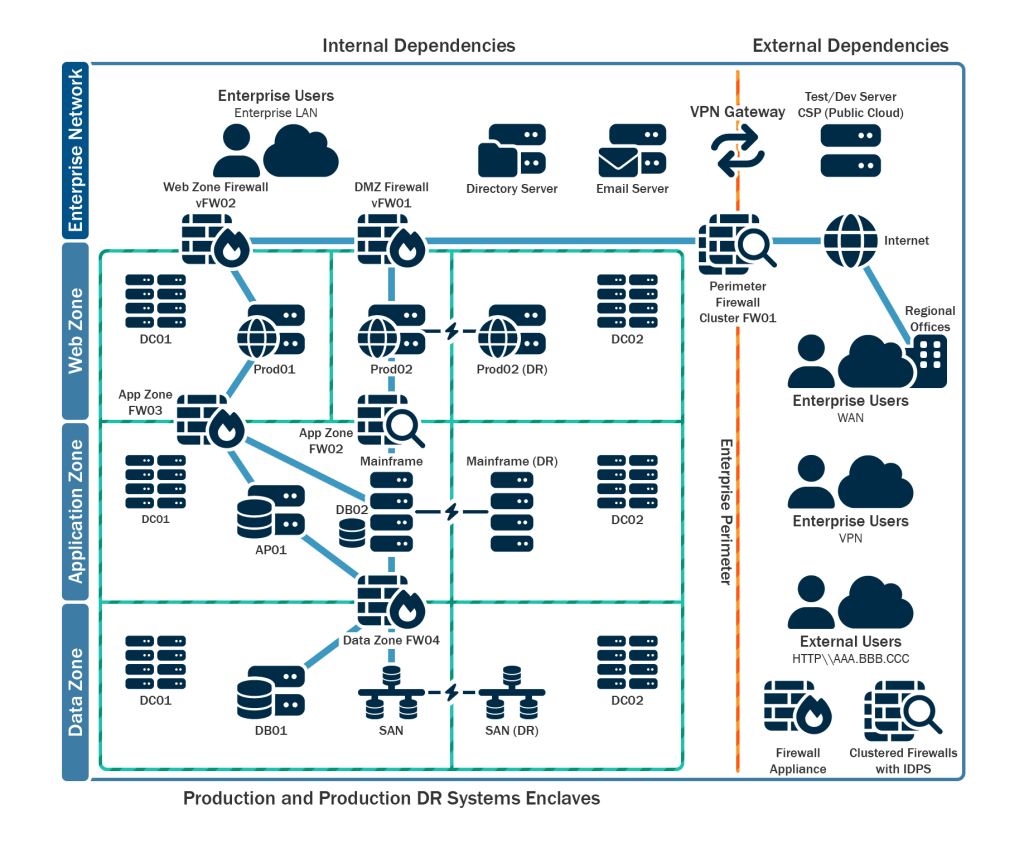
- System dependencies
- Responsible personnel
- Communication procedures
- Temporary work methods
Example:
A file server may be restored before general user workstations.
An accounting system may require database services first.
Email access may be required for vendor communication.
Authentication may be required before any application can be used.
These dependencies should be documented before an incident.
CISA also recommends maintaining system images, recovery procedures, incident response plans, and offline copies of critical documentation.
Test the Recovery Path
Recovery testing should be scheduled.
Testing should include:
- File-level restores
- Full-system restores
- Application recovery
- Database validation
- Identity and authentication
- Cloud account access
- Network dependencies
- Backup credential access
- Recovery time measurement
A cleanroom restore can be used to validate data without reconnecting potentially compromised systems.
The test should answer:
- Is the backup readable
- Is the backup complete
- Is the restore process documented
- Are required credentials available
- Can applications start
- Can users access restored systems
- Does the recovery meet the RTO
- Does the restored data meet the RPO
A recovery plan that has never been tested remains an assumption.
Monitoring Closes the Detection Gap
Backup protection should be monitored as part of the security environment.
Relevant events include:
- Backup job failure
- Backup agent removal
- Storage capacity changes
- Unexpected deletion attempts
- Retention policy changes
- Credential failures
- Unusual administrator activity
- Backup repository access
- Large file-change events
- Cloud snapshot changes
- Encryption or compression anomalies
Monitoring is important because ransomware operators may remain in an environment before encryption begins.
A failed backup may be the first visible indicator.
An unexpected deletion attempt may indicate credential misuse.
An unusual increase in changed files may indicate encryption activity.
X-Tek provides 24/7 security and backup monitoring for business environments.
Backup systems are monitored.
Failures are identified.
Alerts are reviewed.
Issues are remediated according to the service plan.
This approach reduces the risk of discovering a failed backup after the primary system has already been compromised.

X-Tek Backup and Continuity Services
X-Tek evaluates backup protection as part of the broader IT environment.
The review may include:
- Current backup targets
- Data classification
- Retention requirements
- Offsite storage
- Immutable storage options
- Administrative access
- Network segmentation
- Cloud configuration
- Recovery objectives
- Test restore procedures
- Monitoring coverage
Backup services can be aligned with managed IT support, server maintenance, cloud services, and network infrastructure.
See X-Tek business IT support and infrastructure services.
The objective is not simply to create another copy.
The objective is to maintain a usable recovery path when production systems, credentials, facilities, or network access are unavailable.
Backup Review Checklist
Use these questions to identify current gaps:
- Can a domain administrator delete every backup
- Is at least one copy immutable
- Is at least one copy offline or isolated
- Are backup credentials separate from production credentials
- Are cloud backups protected by versioning and retention controls
- Are backup repositories segmented from user networks
- Are deletion attempts monitored
- Are full restores tested
- Are critical applications included
- Are RTO and RPO documented
- Is the recovery order documented
- Are incident response contacts available offline
- Are backups monitored outside normal business hours
A “yes” answer does not prove full resilience.
A “no” answer identifies a control that should be reviewed.
Traditional backups are not automatically ineffective.
They become ineffective when every copy is reachable, mutable, unverified, or too slow to support business operations.
Immutable storage, isolated credentials, offsite protection, recovery testing, and 24/7 monitoring close the primary gaps.
Business continuity depends on more than having data somewhere else.
Contact Information
Business Solutions Information Request:
https://xtekit.com/business-solutions-information-request/
815-516-8075