
Category: blog
Small businesses generally use one of two IT support models
- Break-fix support
- Managed IT services
The difference is operational
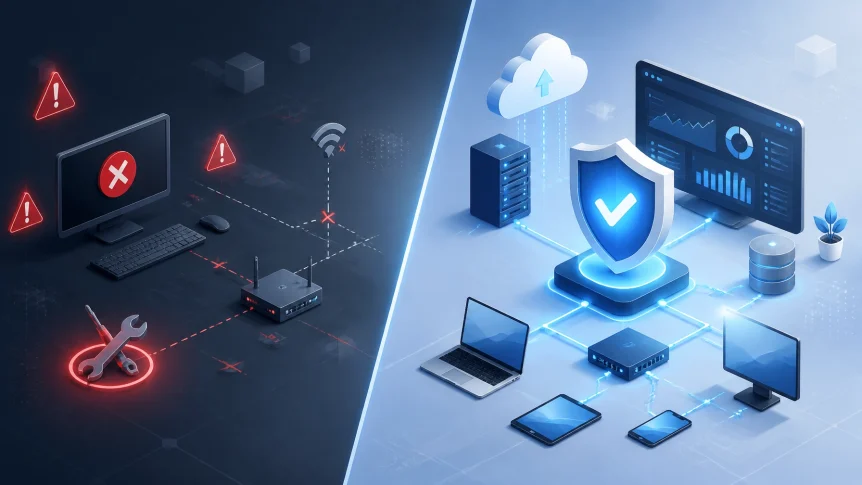
Break-fix responds after a failure
Managed IT identifies and addresses issues before they affect operations
In 2026, the difference includes more than help desk response
It affects
- Cybersecurity
- Backup integrity
- Downtime
- Compliance
- Budgeting
- Cloud operations
- Hardware lifecycle planning
- Employee productivity
Break-fix support
Break-fix support is reactive
A problem occurs
The business contacts a technician
The technician diagnoses and resolves the issue
The business is billed for the work
Common examples
- A server stops responding
- A workstation will not boot
- A network connection fails
- A user loses access to email
- Malware is discovered
- A backup fails during recovery
- A firewall requires replacement
No ongoing service is required between incidents
That can appear cost-effective when IT needs are limited
The model creates operational gaps when systems require continuous monitoring and maintenance
Break-fix support generally does not include
- 24/7 endpoint monitoring
- Scheduled patch management
- Backup verification
- Security event monitoring
- Asset lifecycle tracking
- Vendor coordination
- Disaster recovery planning
- Regular infrastructure reviews
These tasks may be purchased separately
They may also remain the responsibility of business staff
Managed IT services
Managed IT services use an ongoing service model
Systems are monitored
Maintenance is scheduled
Security controls are managed
Support is provided under defined service terms
Issues are identified before users report them when monitoring and alerting are configured correctly
A managed service plan may include
- Remote monitoring and management
- Help desk support
- Server maintenance
- PC and Mac maintenance
- Patch management
- Endpoint security
- Firewall administration
- Network maintenance
- Backup monitoring
- Disaster recovery planning
- Cloud administration
- Vendor management
- Technology planning
X-Tek provides managed support plans and business IT services for small and medium-sized businesses
The objective is service continuity
Not repair volume
Side-by-side comparison
| Area | Break-fix | Managed IT |
|---|---|---|
| Operating model | Reactive | Proactive |
| Billing | Hourly or per incident | Recurring monthly fee |
| Monitoring | Usually limited or absent | Systems are monitored continuously |
| Maintenance | Performed after a problem | Scheduled before failure |
| Security | Often incident-based | Managed as an ongoing function |
| Backups | May be self-managed | Are monitored and reviewed |
| Downtime | Begins before support is engaged | Is reduced through detection and remediation |
| Planning | Limited | Included in service reviews and roadmaps |
| Budgeting | Variable | More predictable |
| Accountability | Focused on individual tickets | Focused on infrastructure performance |
The key difference is timing
Break-fix begins after disruption
Managed IT work begins before disruption
Why 24/7 monitoring matters
Business systems operate outside business hours
A server can fail overnight
A storage volume can reach capacity during the weekend
A backup job can fail before a scheduled recovery
A security alert can occur when no employee is present
Without monitoring, the issue may remain undetected until staff report it
With monitoring, alerts are generated based on defined conditions
Examples include
- Disk health warnings
- Low storage capacity
- Device offline status
- Failed backup jobs
- Unusual login activity
- Endpoint security alerts
- Patch failures
- Network performance changes
- Expiring certificates
- Service interruptions
Issues are reviewed and remediated according to the service process
The result is a shorter window between failure and response
In some cases, a condition is resolved before employees notice an impact

Monitoring does not eliminate every outage
It changes how outages are detected, managed, and documented
Cybersecurity is not a repair task
Break-fix support often addresses security after an event
Examples
- Malware removal after infection
- Password resets after account compromise
- Firewall replacement after an intrusion
- Data recovery after ransomware
- Workstation restoration after unauthorized software installation
Security requires ongoing operation
Controls must be configured
Updates must be applied
Logs must be reviewed
Alerts must be investigated
Users must be trained
Backups must be protected
A managed IT service can coordinate these activities through
- Endpoint detection and response
- Managed antivirus
- Email filtering
- Firewall management
- Patch management
- Multi-factor authentication support
- Vulnerability remediation
- Security awareness procedures
- Incident response planning
- Access reviews
X-Tek also addresses proactive network security for small businesses
No support model guarantees that a breach will not occur
A proactive model reduces exposure and improves response readiness
Backup is only useful when recovery is possible
A backup job marked complete does not prove that business data can be restored
Recovery depends on
- Backup consistency
- Retention settings
- Off-site copies
- Access controls
- Storage capacity
- Restore procedures
- Recovery time objectives
- Recovery point objectives
- Testing frequency
Under a break-fix model, backup problems may remain unnoticed until recovery is required
That is a high-risk operating condition
Under a managed model, backup systems can be monitored continuously
Failures are reported
Retention is reviewed
Restore testing can be scheduled
Recovery procedures can be documented

The difference is significant during ransomware, hardware failure, accidental deletion, or a site outage
A backup strategy should be managed before an incident
Not designed during one
Downtime changes the cost calculation
The visible cost of break-fix is the service invoice
The actual cost also includes
- Employee downtime
- Lost transactions
- Missed deadlines
- Customer service delays
- Emergency shipping
- Overtime
- Data recovery
- Temporary equipment
- Contract penalties
- Reputational impact
A two-hour outage may produce a larger business loss than the repair itself
Downtime costs vary by industry and workflow
Revenue-generating systems, payment systems, scheduling platforms, and production systems usually carry higher exposure
Managed IT reduces risk through
- Preventive maintenance
- Capacity monitoring
- Hardware replacement planning
- Network management
- Tested backups
- Documented recovery procedures
- Defined escalation paths
The goal is not zero incidents
The goal is to reduce incident frequency and impact
Predictable budgeting
Break-fix creates variable expenses
One month may include no IT invoice
The next month may include
- Emergency labor
- Hardware replacement
- Data recovery
- After-hours service
- Security remediation
- Network repair
These costs are difficult to forecast
Managed IT uses a recurring fee based on the agreement scope
The monthly fee may cover monitoring, maintenance, support, and selected security services
Additional project work may still be billed separately
The distinction is that core IT operations are planned and budgeted

A managed IT budget can support
- Monthly forecasting
- Hardware lifecycle planning
- Software renewal planning
- Security investment planning
- Cloud migration planning
- Disaster recovery preparation
Cost predictability does not mean the lowest monthly invoice
It means fewer unplanned costs and better visibility into total IT spending
The value of access to multiple IT disciplines
A small business may need expertise in several areas
- Network infrastructure
- Microsoft cloud services
- Google cloud services
- Cybersecurity
- Server administration
- Endpoint support
- Backup and recovery
- Voice systems
- Website security
- Vendor coordination
One internal employee may not cover every discipline
A break-fix technician may resolve a specific issue without managing the wider environment
A managed IT provider can supply access to multiple roles through one service relationship
X-Tek supports business IT, cloud services, VOIP, web services, and infrastructure
This consolidates service ownership
It also improves documentation and accountability
When break-fix may still fit
Break-fix can be appropriate for a small operation with
- Fewer than five users
- Basic internet access
- Few devices
- No server infrastructure
- Low dependence on technology
- Minimal compliance requirements
- Rare IT incidents
- Low downtime impact
- Internal capacity for routine backups and updates
The model becomes less suitable as the business adds users, applications, cloud services, and sensitive data
A business should reassess the model after
- A major outage
- A ransomware event
- A failed recovery
- Rapid hiring
- Office expansion
- Cloud migration
- Compliance changes
- Repeated emergency invoices
- Increased remote work
- Loss of the employee handling IT
Questions to ask before choosing a provider
Review the service agreement
Confirm whether it includes
- 24/7 monitoring
- Help desk coverage
- On-site support options
- Patch management
- Endpoint security
- Firewall management
- Backup monitoring
- Restore testing
- Response time targets
- After-hours escalation
- Vendor management
- Documentation
- Strategic reviews
- Hardware lifecycle planning
Ask how alerts are handled
Ask who reviews backup failures
Ask how privileged access is controlled
Ask how incidents are documented
Ask whether security services are included or sold separately
Ask what is excluded from the monthly fee
The comparison should be based on operational coverage
Not only the advertised monthly rate
Decision points
Managed IT is generally the stronger model when
- IT supports daily revenue
- Downtime affects customers
- Sensitive data is stored
- Systems operate continuously
- Cybersecurity requirements are increasing
- Internal IT capacity is limited
- Backup recovery must be reliable
- Monthly budgeting is important
- The business is growing
Break-fix remains a limited support option
It addresses individual problems
Managed IT manages the environment
For most small businesses in 2026, 24/7 monitoring, proactive maintenance, managed cybersecurity, and verified backups provide more operational value than waiting for the next failure
Contact Information
Business Solutions Information Request:
https://xtekit.com/business-solutions-information-request/
815-516-8075