
WordPress category: blog
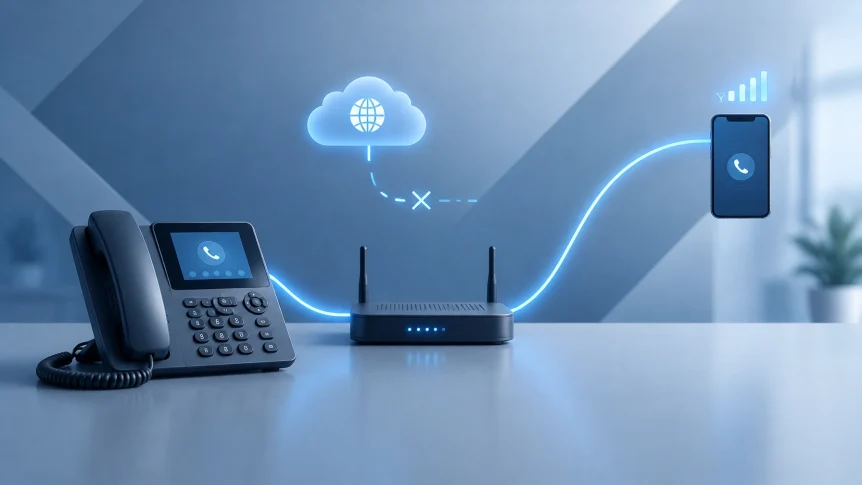
A desk phone can lose service when its internet connection fails.
That does not always mean every business call is lost.
What callers hear, and whether staff can still make calls, depends on the phone system, the outage, and the failover plan configured before it happens.
What stops working
A VoIP desk phone needs power and a network connection to reach its phone service.
If the office internet goes down, a phone registered to a cloud phone system will usually lose that connection. It may display an offline message, have no dial tone, or be unable to place or receive calls.

A phone can also lose service during a power outage. Routers, switches, wireless access points, and many desk phones need power. Power over Ethernet does not remove that dependency; the switch providing power must also stay online.
An outage at the office does not necessarily take down the cloud phone platform. The provider may still be able to process calls and redirect them, if alternate destinations and routing rules have been configured.
What callers experience
The result depends on the point of failure and the system’s call handling.
If there is no failover plan:
- Inbound calls may reach voicemail, follow the existing auto-attendant rules, or fail to connect.
- Calls to an affected desk phone may not ring.
- Outbound calls from that phone generally cannot be placed.
- Staff may have no clear way to tell callers what is happening.
If failover is configured:
- Calls may be sent to a mobile number, another office, a call group, or voicemail.
- A cloud auto attendant may continue to answer and direct callers.
- Staff may use a VoIP app over a separate cellular connection.
- A backup internet path may keep office phones connected.
These options are not automatic features of every VoIP system. They depend on the provider, configuration, licenses, network design, and the type of outage.
How failover routing works
Failover routing sets an alternate destination for calls when the usual phone or location is unavailable.
For example, an inbound call to the main business number may normally reach an auto attendant, then a reception group. If the office connection fails, the system can route that call to a designated mobile phone or alternate team.

Routing may be configured at more than one level:
- Phone or extension: Send calls to voicemail or another number when a user’s device is unreachable.
- Main business number: Redirect calls to a backup destination if the main call path is unavailable.
- Call group or queue: Route unanswered calls to another group, location, or mobile destination.
- Provider or site recovery: Use a separate network path or local gateway, where supported.
Provider documentation describes features such as extension-level forwarding and service options during internet or power outages. See Intermedia’s phone troubleshooting guidance and 8×8’s outage guidance.
A key distinction: inbound and outbound calls need separate planning. Forwarding the main number may preserve incoming calls, but it does not necessarily give employees a way to call customers from the business number. Mobile apps, cellular service, an alternate internet connection, or a local survivability solution may be needed for outbound calling.
Backup internet and power
A backup internet connection can reduce disruption. It is most useful when it does not share the same failure points as the primary connection. Before relying on any connection, know how it performs — a quick quality test shows latency, jitter, and loss at a glance.
Two services using the same cable, network equipment, or local infrastructure may fail together. A different carrier or connection type, such as wired broadband paired with cellular, may offer better separation, depending on local availability and design.
Backup power matters too. A battery backup may keep selected networking equipment running during a short outage. It must support the equipment required for calls, such as the router and network switch. Battery capacity and runtime need to match the expected use.

A cellular backup router may help maintain the office connection, but it also needs power and usable cellular coverage. A mobile VoIP app may work if it can connect over cellular data and the user has access to the app and account. An app connected to office Wi-Fi is not an independent backup when the office internet is down.
Some business phone platforms support local survivability or alternate carrier paths. Those designs require specific equipment and setup. Zoom’s local survivability documentation describes one approach for maintaining certain phone functions when cloud connectivity is lost.
Build a communications continuity plan
Start with the calls that cannot be missed.
List the business numbers, extensions, call groups, and user roles that need an alternate route. Include reception, customer support, sales, management, after-hours calls, and any numbers tied to time-sensitive operations.
Then document:
Primary call flow
How calls move from the public number to the auto attendant, staff, queues, and voicemail.Failure destinations
The alternate number, location, or voicemail destination for each critical call path.Outbound calling method
How staff will place calls if desk phones lose service. Confirm whether the business number can be presented from a mobile app or alternate device.Power and connectivity dependencies
Identify the internet handoff, router, switches, wireless network, phones, and provider services required for normal operation.People and responsibilities
Specify who checks the outage, who contacts the provider, who communicates with staff, and who approves any manual rerouting.Emergency communications
Confirm how staff will reach emergency services and one another if business phones are unavailable. Validate emergency calling behavior for each device and location with the phone provider.Recovery and failback
Define how the system returns to normal routing after service is restored, and who verifies that calls are working.
Keep the plan accessible outside the office network. Store current contact numbers and routing instructions where authorized staff can reach them during an outage.
Test the plan
A configured failover rule is not proof that it works.
Test the call paths on a schedule and after changes to the provider, phone numbers, network, or staffing.
Check:
- Calls to the main number during a simulated loss of office internet
- Auto-attendant prompts and menu choices
- Ring groups, queues, voicemail, and call forwarding
- Outbound calls from alternate devices
- Caller ID and the number displayed to recipients
- Staff access to mobile apps and account credentials
- Power backup runtime for required network equipment
- Restoration of normal routing after the test
Record the test date, results, issues, and assigned follow-up. A test should confirm not only that a call reaches a backup destination, but also that the person receiving it knows how to answer and continue the conversation.
X-Tek managed VoIP and continuity planning
X-Tek provides cloud and on-premise VoIP telephony. Continuity planning starts with the current call flows, network, power dependencies, and business requirements.
We can assess how the system is configured, identify likely points of failure, and plan suitable routing and backup options. The design depends on the phone platform, internet providers, equipment, and which calls need to remain available.
For additional context on VoIP systems, see Do You Really Need a VoIP Phone System?.
A practical plan has defined alternate routes, supported backup connections, documented staff procedures, and tested recovery steps. Without those pieces, an outage may leave callers with no clear path to reach the business.
Contact Information
Business Solutions Information Request:
https://xtekit.com/business-solutions-information-request/
815-516-8075