
Category: blog
Zero Trust
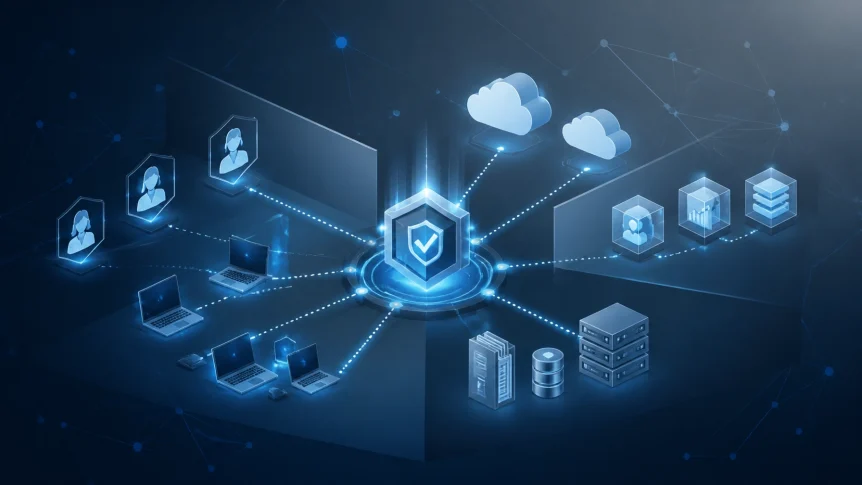
Zero trust removes implicit access.
A user is not trusted because they are inside the office
A device is not trusted because it is company-owned
A connection is not trusted because it uses the business network
Each access request is verified
Each resource is protected separately
The model is based on three controls
- Identity verification
- Least-privilege access
- Continuous monitoring
NIST SP 800-207 describes zero trust architecture as a shift from network-based perimeters to users, assets, and resources
CISA’s Zero Trust Maturity Model uses the same operating direction
Small businesses do not need to replace every system at once
Implementation can be phased
Start With Identity
Identity is the first control point
Every account should represent one person or one approved service
Shared credentials create gaps
Generic administrator accounts create gaps
Inactive accounts create gaps
Account inventory
Document
- Employees
- Contractors
- Vendors
- Service accounts
- Administrative accounts
- Cloud applications
- Remote access accounts
Remove accounts that are no longer required
Separate standard user accounts from administrative accounts
Administrative access should be performed only when required
Multi-factor authentication
MFA should be enabled for
- Microsoft 365
- Google Workspace
- VPN
- Remote desktop
- Cloud applications
- Password managers
- Financial systems
- Backup platforms
- Network administration
Authenticator applications and security keys provide stronger protection than SMS
MFA enrollment should be required during onboarding
Recovery methods should be documented and controlled
MFA exceptions should be limited and reviewed

Single sign-on
A central identity provider reduces account sprawl
Microsoft 365, Google Workspace, or another approved identity platform can be used as the primary directory
Business applications should be connected through SSO where supported
Benefits
- One account lifecycle
- Faster offboarding
- Centralized MFA
- Consistent policy enforcement
- Fewer stored passwords
- Improved login visibility
Verify Devices
A valid password does not confirm device security
Access decisions should include device status
Review
- Operating system version
- Patch status
- Endpoint protection
- Disk encryption
- Screen-lock settings
- Local administrator rights
- Device ownership
- Mobile device management status
Unmanaged devices should not receive unrestricted access to business systems
Conditional access policies can require additional verification
Access can be blocked when
- A device is not enrolled
- Endpoint protection is disabled
- The operating system is outdated
- The login location is unusual
- Sign-in behavior indicates risk
- The device fails compliance checks
Personal devices should be handled through documented BYOD controls
Apply Least Privilege
Least privilege limits the effect of a compromised account
Users receive only the access required for their role
Access should be granted to specific applications and data
Not to the entire network
Role-based access
Create roles based on business functions
Examples
- Sales
- Operations
- Finance
- Human resources
- Management
- IT administration
- External support
Each role should have documented permissions
Broad group memberships should be removed
File shares should be reviewed
Cloud application permissions should be reviewed
Local administrator rights should not be assigned by default
Protect critical resources
Identify systems containing
- Customer records
- Financial information
- Payroll data
- Intellectual property
- Contracts
- Credentials
- Payment information
- Backup data
Apply stronger controls to these systems
- MFA
- Conditional access
- Separate administrator accounts
- Network segmentation
- Restricted sharing
- Audit logging
- Backup isolation
Backups should not be accessible from every standard user account
Backup administration should be separated from ordinary workstation access
Onboarding and offboarding
New accounts should be created from approved role definitions
Access should be removed when employment or vendor relationships end
Offboarding should include
- Account disablement
- Session termination
- Token revocation
- MFA device review
- VPN removal
- Application access removal
- Password rotation for shared service credentials
- Company device recovery
Quarterly access reviews should be scheduled
A manager should confirm that each user still requires assigned permissions

Segment the Network
A flat network allows excessive movement after a compromise
Network segmentation limits that movement
Separate
- Staff devices
- Servers
- Guest Wi-Fi
- Voice systems
- Security devices
- Payment systems
- Backup infrastructure
- Internet of Things devices
VLANs and firewall rules can be used to separate traffic
Guest Wi-Fi should not reach internal business systems
Voice traffic should be isolated where practical
Backup systems should be restricted to approved management and replication paths
Critical applications should not be reachable from every workstation
Remote access should be limited by user, device, application, and session
Traditional VPN access can provide broad network visibility after login
Zero Trust Network Access can provide application-specific access instead
The correct design depends on existing infrastructure
Network changes should be documented before deployment
Add Continuous Monitoring
Zero trust depends on visibility
Access decisions cannot be reviewed if events are not recorded
Monitoring should include
- Identity provider sign-ins
- Failed authentication attempts
- MFA failures
- Administrative changes
- Endpoint alerts
- Firewall events
- VPN or ZTNA sessions
- DNS activity
- Network traffic anomalies
- Backup failures
- New device connections
- Privilege changes
Logs should be retained according to business and compliance requirements
Alerts should be assigned to a monitored process
An alert without review does not provide protection
X-Tek network security monitoring
X-Tek networks are monitored for security events, system conditions, and operational changes
Suspicious activity can be investigated
Security issues are identified
Remediation actions are initiated
Vulnerabilities and patch conditions are reviewed
Firewall rules and endpoint status are checked
Backup success and recovery conditions are monitored as part of broader IT operations
The X-Tek proactive network security approach outlines the role of continuous monitoring, endpoint protection, firewall management, access controls, and backup verification
Monitoring coverage should include both cloud and on-premises systems
Remote workers should not be excluded from visibility

Build a Response Process
A zero trust program requires defined actions
Document the response to
- Suspicious sign-ins
- Lost devices
- Compromised accounts
- Malware detections
- Unapproved applications
- Unexpected privilege changes
- Backup failures
- Network anomalies
The initial process should identify
- Who reviews the alert
- Who can disable the account
- Who can isolate the device
- Who contacts leadership
- Which systems require notification
- How evidence is preserved
- When external support is engaged
Response actions should be tested
Contact lists should be kept outside the affected environment
Administrative access should be available during an outage
A 90-Day Starting Plan
Days 1–30
- Inventory users and devices
- Remove inactive accounts
- Enable MFA on critical systems
- Eliminate shared user accounts
- Separate administrator accounts
- Review cloud application access
- Confirm backup access restrictions
Days 31–60
- Deploy or validate endpoint protection
- Apply conditional access policies
- Segment guest Wi-Fi
- Separate critical servers and backups
- Review firewall rules
- Restrict remote access
- Centralize identity and security logs
Days 61–90
- Add monitoring for identity, endpoints, firewalls, and backups
- Complete a quarterly access review
- Test account disablement
- Test device isolation
- Review alert escalation
- Document exceptions
- Plan application-specific remote access
- Schedule recurring security assessments
Common Implementation Errors
Treating zero trust as one product
Zero trust is an operating model
It uses identity, device management, access policy, network controls, application security, data protection, and monitoring
Enabling MFA without reviewing permissions
MFA protects the login
It does not correct excessive access
Permissions still need to be reduced
Protecting cloud systems but ignoring local infrastructure
Servers, network devices, printers, VoIP systems, and backup appliances require controls
Coverage should match the full environment
Creating policies without monitoring
A policy must be enforced
Enforcement requires logging, alerting, and review
Applying every control at once
Large changes create operational risk
Prioritize administrator accounts, email, remote access, finance systems, and backup infrastructure
X-Tek Support
Zero trust implementation can be integrated with managed IT operations
X-Tek managed IT services include monitoring, maintenance, cybersecurity management, backup and disaster recovery support, and strategic planning
We assess the current environment
Access is documented
Controls are prioritized
Network security monitoring is deployed
Exceptions are reviewed
The result is a staged security program based on current systems and business requirements
Request an assessment through the X-Tek Business Solutions Information Request
Contact Information
Business Solutions Information Request:
https://xtekit.com/business-solutions-information-request/
815-516-8075